Shaping a Report
Filtering and Sorting
T3 API Reports can be configured to include filters, sorting, and can return either JSON or CSV data.
- If you wanted to only return packages in the Bulk Storage room, you would add
&filter=locationName__eq:Bulk Storageto your Sync Link - If you wanted to control which columns you want in the report, you would add
&columns=label,productionBatchNumber,labTestingStateNameto your Sync Link
A filter is spelled field__operator:value. Repeat filter to apply more than one, and set filterLogic to and (the default) or or to say how they combine:
| Operator | Meaning |
|---|---|
eq | equals |
neq | not equals |
contains | contains |
doesnotcontain | does not contain |
startswith | starts with |
endswith | ends with |
lt | less than |
lte | less than or equal |
gt | greater than |
gte | greater than or equal |
Sorting takes a single field and direction, &sort=label:asc or &sort=label:desc, and orders rows within each license rather than across them.
Details here: https://api.trackandtrace.tools/v2/docs/#/Reports/get_v2_packages_active_report
Limiting the Number of Rows
Reports return the entire matching dataset by default, which can be very large. Add &rowLimit=100 to your Sync Link to cap how many records come back.
Start with a small rowLimit while you are still building the request. Getting the filters and columns right usually takes a few attempts, and there is no reason for each attempt to pull your whole dataset. &rowLimit=10 returns in a second or two and shows you the exact same columns and formatting the full report will produce, so you can confirm your filter matches what you expect, check that a columns list is spelled correctly, and see the CSV layout before committing to the real run. Drop the parameter when it all looks right.
- The minimum is
1. OmitrowLimitto return everything. - Every report also enforces a hard cap of its own: 50,000 records for a report, 5,000 for a super report. A
rowLimitabove that cap is clamped down to it, which is the same as leavingrowLimitoff. - Both the cap and
rowLimitare totals across every requested license, not per-license allowances. See Reporting Across Multiple Licenses. - A
rowLimitcan rescue a request that would otherwise be rejected as too large. A license with 100,000 active packages will normally fail, but&rowLimit=500succeeds and returns 500 packages. - Which records you get depends on the sort order. Pair
rowLimitwithsortfor a predictable result, for example&sort=label:asc&rowLimit=100. - The limit counts top-level records. Reports that expand one record into several rows, such as the transfer manifest reports, or a super report cross-joined on an
includein CSV format, can return more rows than the limit. On a super report,rowMode=collapsedremoves that gap: one row per record means the limit counts rows exactly. - Changing
rowLimitloads fresh data, because it changes which records are fetched. Changingcolumns,contentType,contentDispositionorprependCsvMetadatadoes not, those are applied to data already loaded, so re-requesting with different columns is served from cache and returns immediately.
Specifying Field Names
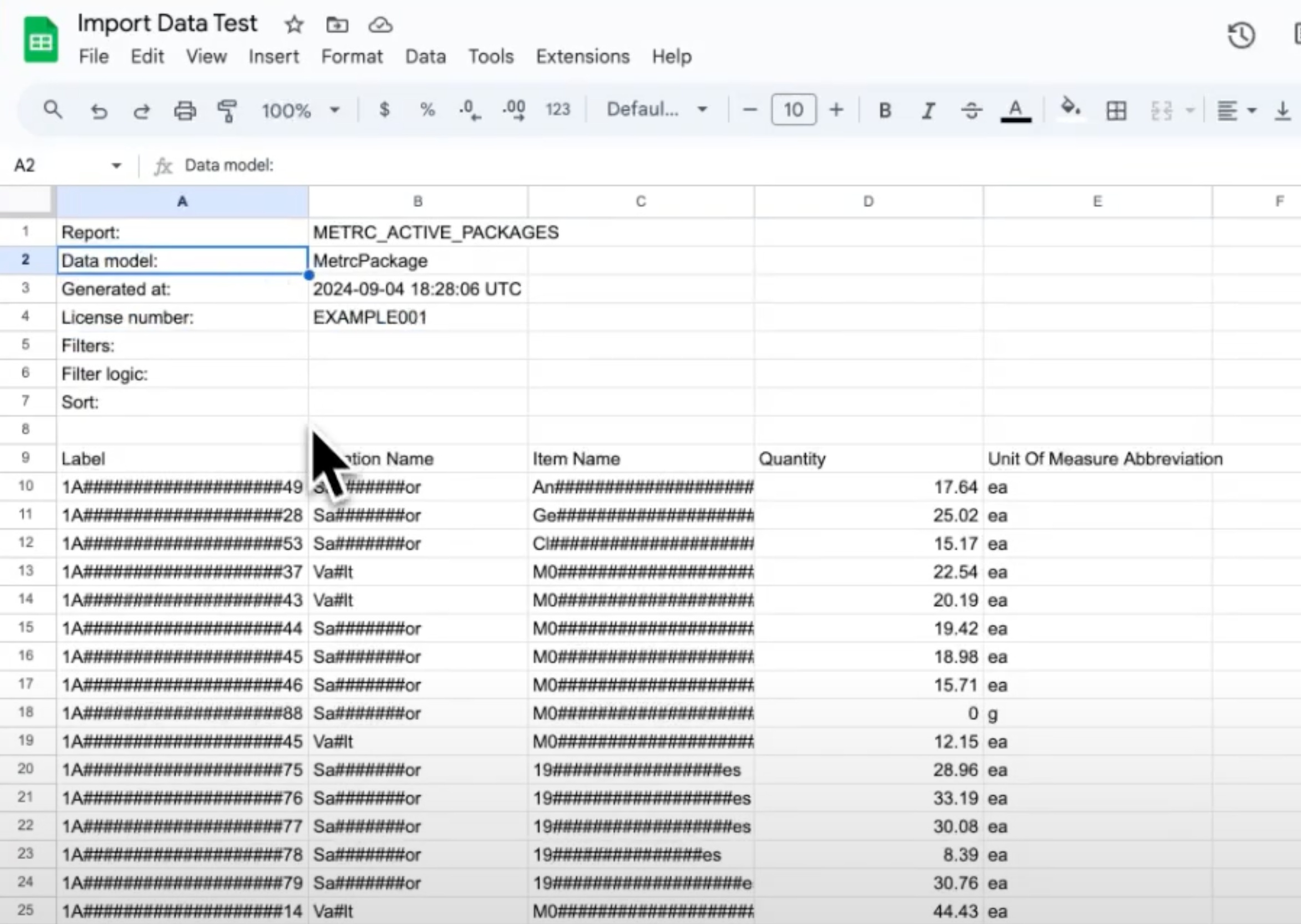
Each report header shows dataModel. The dataModel describes what objects are being returned for the current report, and what columns are available.
In the API response, the data model is listed as MetrcPackage. To see a list of columns for MetrcPackage, refer to the API docs: at the bottom of the page, there is a Schemas section:
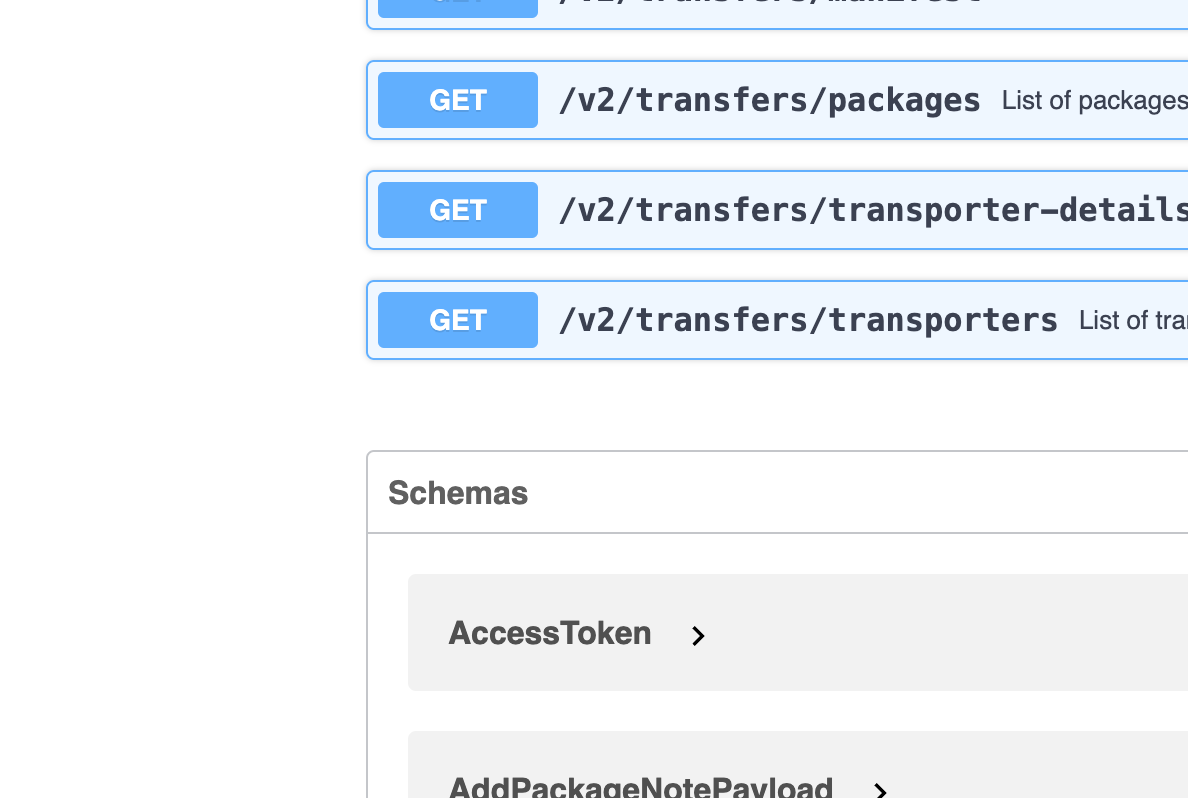
In Schemas, find MetrcPackage and expand it to see all the possible columns:
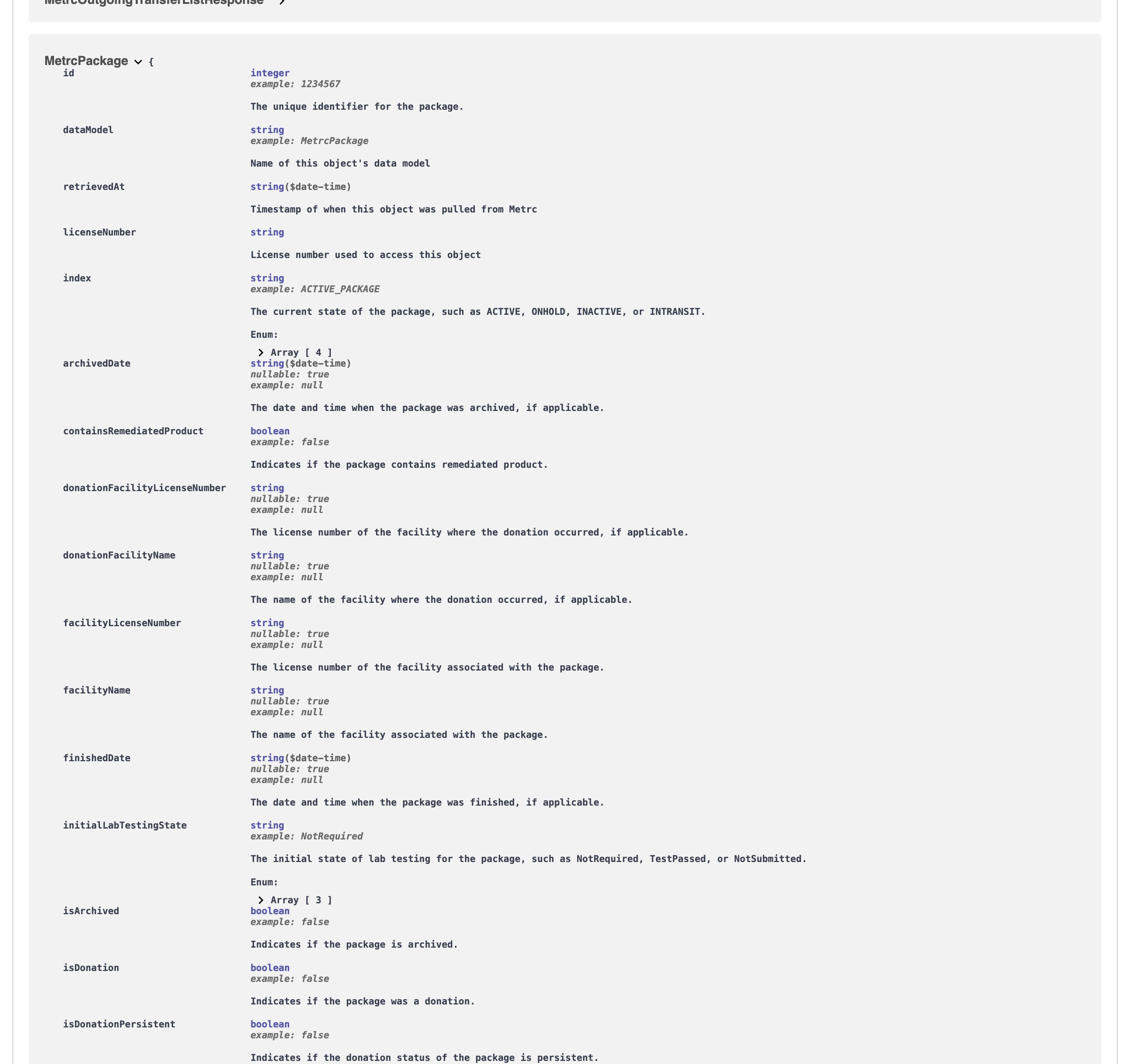
So if you wanted to specify the columns to show License Number, Facility Name, Label, and Production Batch Number, you would add the following to your Sync Link:
https://api.trackandtrace.tools/v2/packages/active/report?licenseNumber=...&columns=licenseNumber,facilityName,label,productionBatchNumber
These will be returned as the column headers.
In CSV output the headers are title-cased from the field names, so productionBatchNumber appears as Production Batch Number.
If you misspell a field name, the report returns an error listing every valid field for that data model. See Invalid columns.
columns was previously called fieldnames
Both spellings work and mean exactly the same thing, so existing Sync Links and saved reports keep running untouched; there is nothing you need to change. fieldnames is deprecated and columns is the name documented from here on, so prefer it for anything new. Sending both in one request returns a 400, since there is no way to tell which column list you meant.
MetrcPackage has a special scenario, where item is nested inside it.
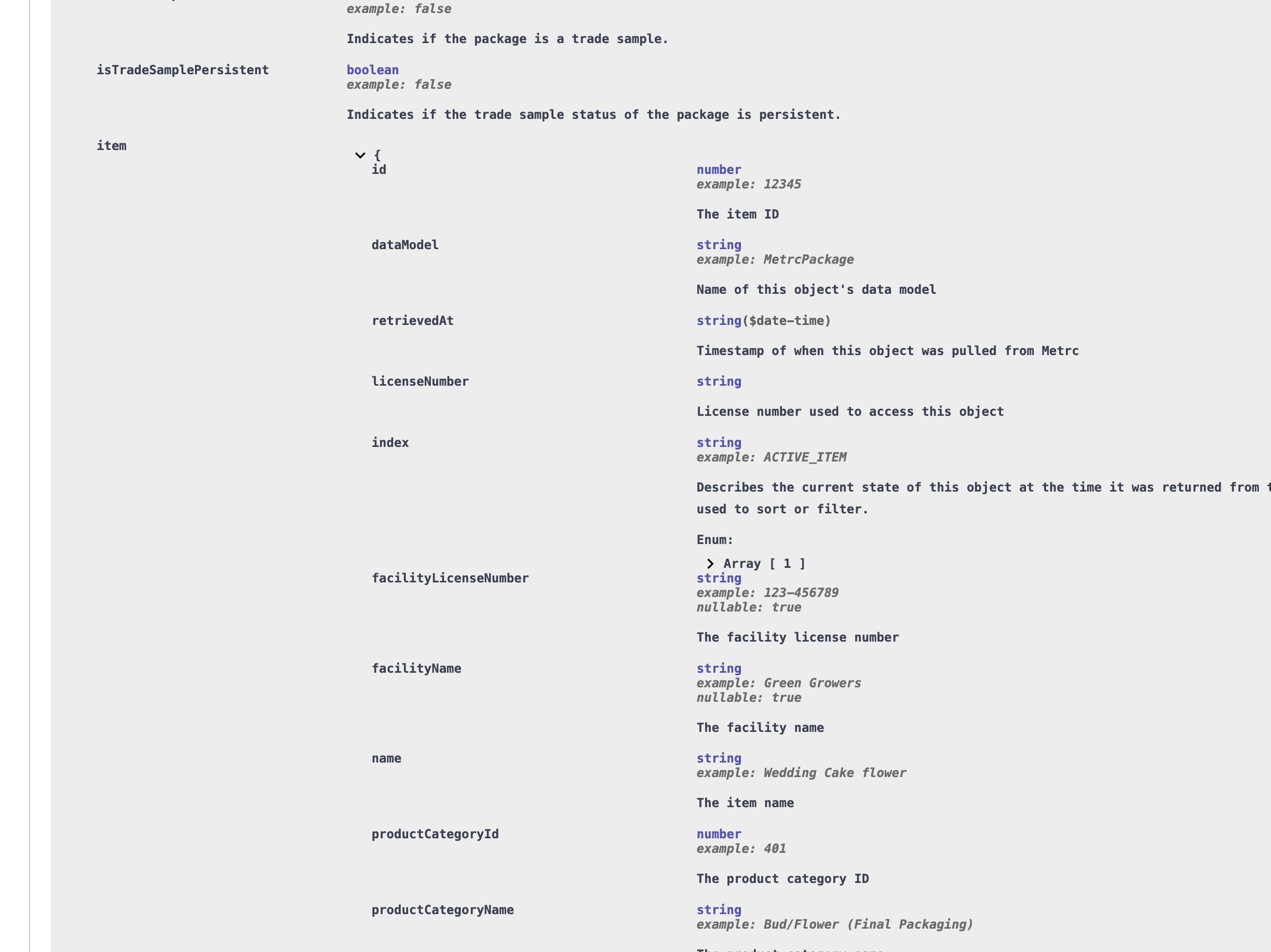
If you want to show an item column, you add item.* in front of it. For example, the Item Category, you would use item.productCategoryName.
Example URL:
https://api.trackandtrace.tools/v2/packages/active/report?licenseNumber=...&columns=licenseNumber,facilityName,label,productionBatchNumber,item.productCategoryName
Four nested item fields are available this way: item.name, item.strainName, item.productCategoryName and item.unitThcContent. Packages are the only Metrc object with nesting like this, and item on its own is not a valid column.
The transfer manifest reports are the other exception: they join several objects, so every column carries the prefix of the object it came from, transfer., package., transporter., and on outgoing manifests also delivery. and transporterDetails..
Renaming the Column Headers
Headers are title-cased from the field names, which is not always the name you want. Add &columnHeaderOverrides= to replace them with your own.
The value is a comma-separated list matched positionally against the columns, and an empty entry keeps that column's default name. So to rename only the fourth of six columns, count three commas first:
https://api.trackandtrace.tools/v2/packages/active/report?licenseNumber=...&columns=label,item.name,quantity,unitOfMeasureAbbreviation&columnHeaderOverrides=,,,Unit
Trailing entries can be dropped entirely, so &columnHeaderOverrides=Tag renames just the first column and leaves the rest alone.
This is most useful on the transfer manifest reports, whose columns carry an object prefix that reads awkwardly once title-cased:
| Column | Default header | With an override |
|---|---|---|
package.packageLabel | Package Package Label | Package Tag |
transfer.manifestNumber | Transfer Manifest Number | Manifest |
transporterDetails.driverVehicleLicenseNumber | Transporter Details Driver Vehicle License Number | Plate |
Names are used exactly as you send them. No title-casing, no trimming, no change of case, qty stays qty. That is what makes it safe to point a pivot table, a Power Query step or a partner's import template at a header. A name beginning with = is written as text, never as a live spreadsheet formula.
Two rules to know:
- A header cannot contain a comma. A comma always starts a new entry, and encoding it as
%2Cdoes not help; it is decoded back to a comma before the list is split. - You can send fewer entries than there are columns, but not more. Extra entries return a
400rather than being ignored, because a list longer than the report is a miscount and a silently truncated one produces a header row that looks right. Trailing commas count as entries:,,,Unit,,is six of them.
The parameter applies to the tabular formats, csv, xlsx and googleSheets. A json report returns records keyed by their field names and is unaffected, so you can set it once alongside a contentType that varies. It also cannot be combined with transform, which names its own columns.
Renaming a header does not change which data is loaded, so switching headers on a report you just pulled is served from cache rather than fetched again from Metrc.
#!/usr/bin/env python3
# /// script
# requires-python = ">=3.8"
# dependencies = [
#     "httpx",
# ]
# ///
"""Pull an incoming manifest report with headers a warehouse team will recognize."""

import httpx

SECRET_KEY = "YOUR_SECRET_KEY_GOES_HERE"
LICENSE_NUMBER = "LIC-00001"

COLUMNS = [
    "transfer.manifestNumber",
    "transfer.recipientFacilityName",
    "package.packageLabel",
    "package.productName",
    "package.shippedQuantity",
]

HEADERS = ["Manifest", "Destination", "Tag", "Product", "Qty"]

response = httpx.get(
    "https://api.trackandtrace.tools/v2/transfers/incoming/manifest/report",
    params={
        "licenseNumber": LICENSE_NUMBER,
        "contentType": "csv",
        "columns": ",".join(COLUMNS),
        "columnHeaderOverrides": ",".join(HEADERS),
        "prependCsvMetadata": "false",
    },
    headers={"X-T3-API-Key": SECRET_KEY},
    timeout=300,
)
response.raise_for_status()

print(response.text.splitlines()[0])
# Manifest,Destination,Tag,Product,Qty
Next Steps
- Pick a format and decide whether it downloads in Output Format.
- Send the result somewhere with Delivering a Report.
- See these parameters combined in Report Examples.
- If a column name is rejected, see Invalid columns.