Label Studio
The T3 Label Studio can instantly generate high-quality, printable label PDFs prefilled with data from Metrc.
- Fully customizable layouts with support for images, tables, barcodes, and QR codes
- Compatible with all label sizes and printer types, including thermal, laser, inkjet, and direct-to-tag
- Automatically populated with data pulled directly from Metrc
- Built on a powerful templating language for complete control over design and content
Label Generation via the Chrome Extension
The T3 Chrome Extension offers a smooth interface to quickly generate and download label PDFs.
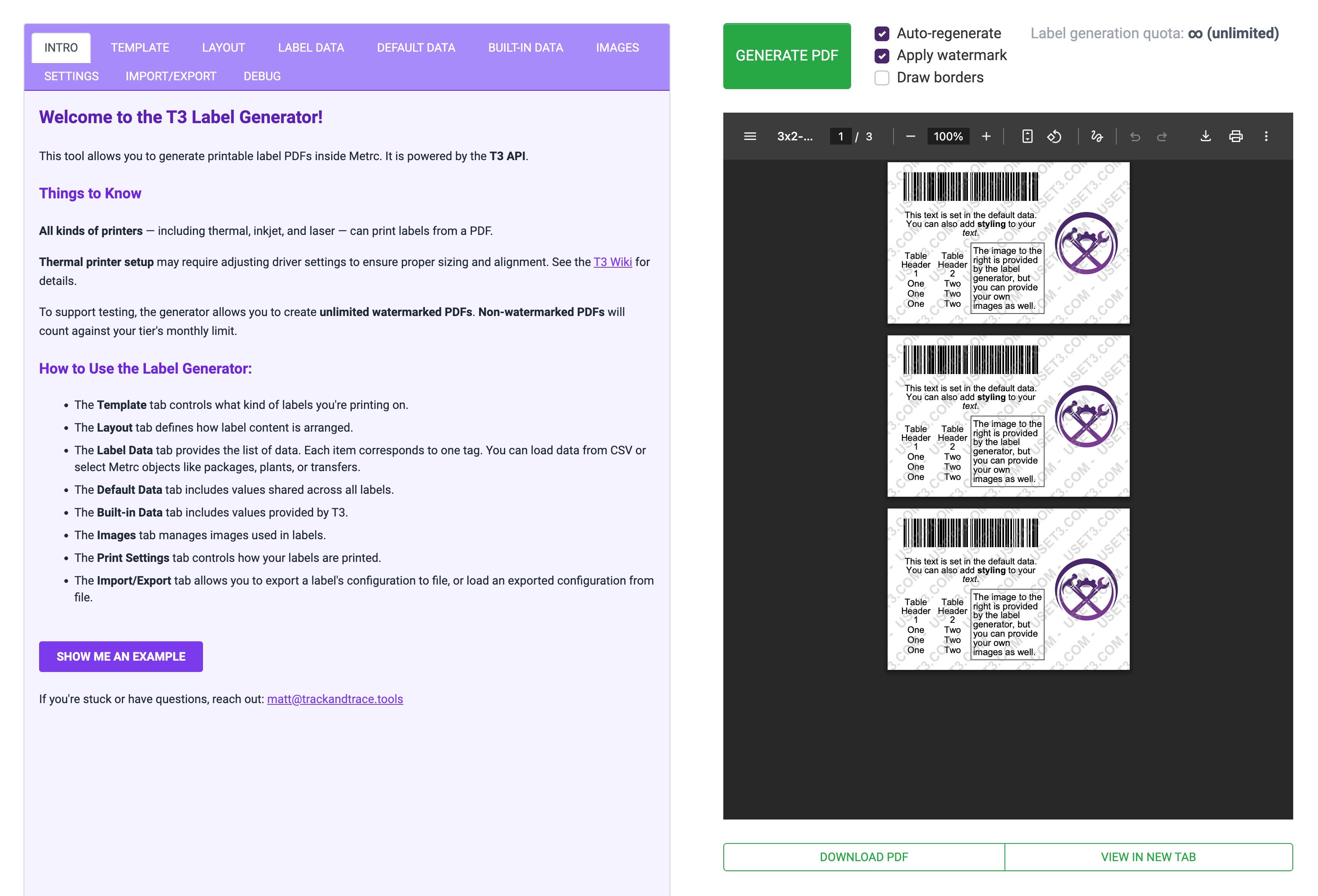
T3 Chrome Extension label generation interface
Every tab and control is documented in the T3 Label Studio reference.
T3 Free is a preview
T3 Free users can open the Label Studio and design labels with starter templates and demo data, but Metrc data cannot be loaded and generated labels are watermarked. Both restrictions are lifted by T3+.
Label Generation via the T3 API
Labels can also be generated via the T3 API.
Every label PDF is built from three pieces that you control independently, whether you build them in the Studio or send them yourself:
- A template defines the physical medium: label dimensions, page size, margins, padding, and how labels are arranged on a page. See Label Templates.
- A layout defines what actually appears on each label (text, tables, images, barcodes, and QR codes) and how those elements are positioned within the printable area. See Label Layouts.
- A data list is the set of per-label values that are injected at render time (for example, a list of package tags). See Generating Label PDFs.
Layouts are responsive to template dimensions, so you can design a layout once and reuse it across different label sizes. Layouts can be static (every label identical), dynamic (each label filled with different data), or a mix.
Learn More
| To learn about | Read |
|---|---|
| The Label Studio interface, tabs, the layer stack, fragments, saving | Label Studio |
| Building a label from scratch, step by step | T3 Labels Tutorial |
| Pulling Metrc data into a label with Jinja | Label Studio: Label Data |
| Designing a label before you have loaded any data | Template Preview Mode |
| Reusing a block across many labels | Fragments |
| Every template field, with worked examples | Label Templates |
| Every layout element and styling option | Label Layouts |
| Supported printers, drivers, and print settings | Printing Label PDFs |
Next Steps
- Work through the T3 Labels Tutorial to build a label from scratch.
- Keep the Label Studio reference open while you build.
- Learn how to print label PDFs reliably.
- Learn about other T3+ features
- Install the T3 Chrome Extension