Choosing a Label Printer
Choosing a label printer involves balancing a number of factors:
-
Label Size: Smaller labels require more precise printing, especially if they contain small text or barcodes. This typically means a higher DPI printer. Larger labels may require a printer with a bigger form factor to accommodate the media.
-
Print Volume: Consider how many labels you need to print on a daily or weekly basis. High-volume operations benefit from industrial-grade printers designed for continuous use, while low-volume needs can often be met with desktop models.
-
Print Type: Options include thermal transfer, direct thermal, inkjet, and laser. Thermal printers are the most common in industrial environments due to their speed and durability. Inkjet and laser printers are better suited for full-color printing or label sheets.
-
Print Speed: In high-throughput settings, print speed can become a bottleneck. Look for specifications in inches per second (IPS) to evaluate performance.
-
Connectivity: Ensure compatibility with your systems. USB is standard, but Ethernet is ideal for shared workstations or networked environments. Some models also offer Wi-Fi or Bluetooth.
-
DPI (Dots Per Inch): Lower DPI (203 dpi) is suitable for larger labels or basic use cases. Higher DPI (typically 300 dpi or more) is essential for printing legible small fonts, sharp barcodes, and detailed graphics. Most base-tier thermal printers print at 203 dpi, and increasing DPI incurs a substantial jump in printer cost.
-
Label Durability: For long-lasting labels or those exposed to heat, moisture, or abrasion, thermal transfer printers are preferable. Direct thermal is acceptable for short-term labeling where durability is less critical.
-
Color Printing: Most thermal printers are monochrome. If your labels require color (for branding, compliance symbols, or product identification), you’ll need a printer that supports color output, such as an inkjet or laser model.
-
Cutter/Peeler Options: Some printers include built-in cutters or peel-and-present mechanisms that can greatly improve efficiency in high-volume labeling workflows.
Types of Printers
Direct Thermal printers use heat-sensitive paper and do not require ink or ribbons. They are simpler and cheaper to operate but produce labels that fade over time, making them better for short-term use such as shipping labels.
Thermal Transfer printers use a ribbon to melt ink onto the label surface, producing long-lasting, high-contrast prints. These are ideal for labels that must withstand moisture, sunlight, or long storage periods. Some thermal transfer printers are capable of printing directly onto Metrc tags, eliminating the need for separate labels. Be sure to verify compatibility with Metrc-supplied tag stock before purchasing.
Inkjet and Laser Printers are best suited for printing on label sheets from vendors like Avery. These are commonly used for small batch jobs. While they offer flexibility, they are generally slower and less durable than thermal options.
Cost
Thermal printers typically have a higher upfront cost but lower operating costs over time due to fewer consumables. Inkjet and laser printers may be cheaper to acquire, but the cost of toner or ink and label sheets adds up quickly.
Factor in ribbon, label rolls, and maintenance when estimating total cost of ownership for thermal units.
Setting Up Your Printer
This section assumes you have purchased a printer, have powered it on, and connected it to your computer via network or USB.
To ensure compatibility and proper sizing, always install the latest drivers for your specific printer model.
Note: When adding your printer, your operating system may offer a default driver for printing. It's strongly recommended that you install any available drivers from the manufacturer and use that instead.
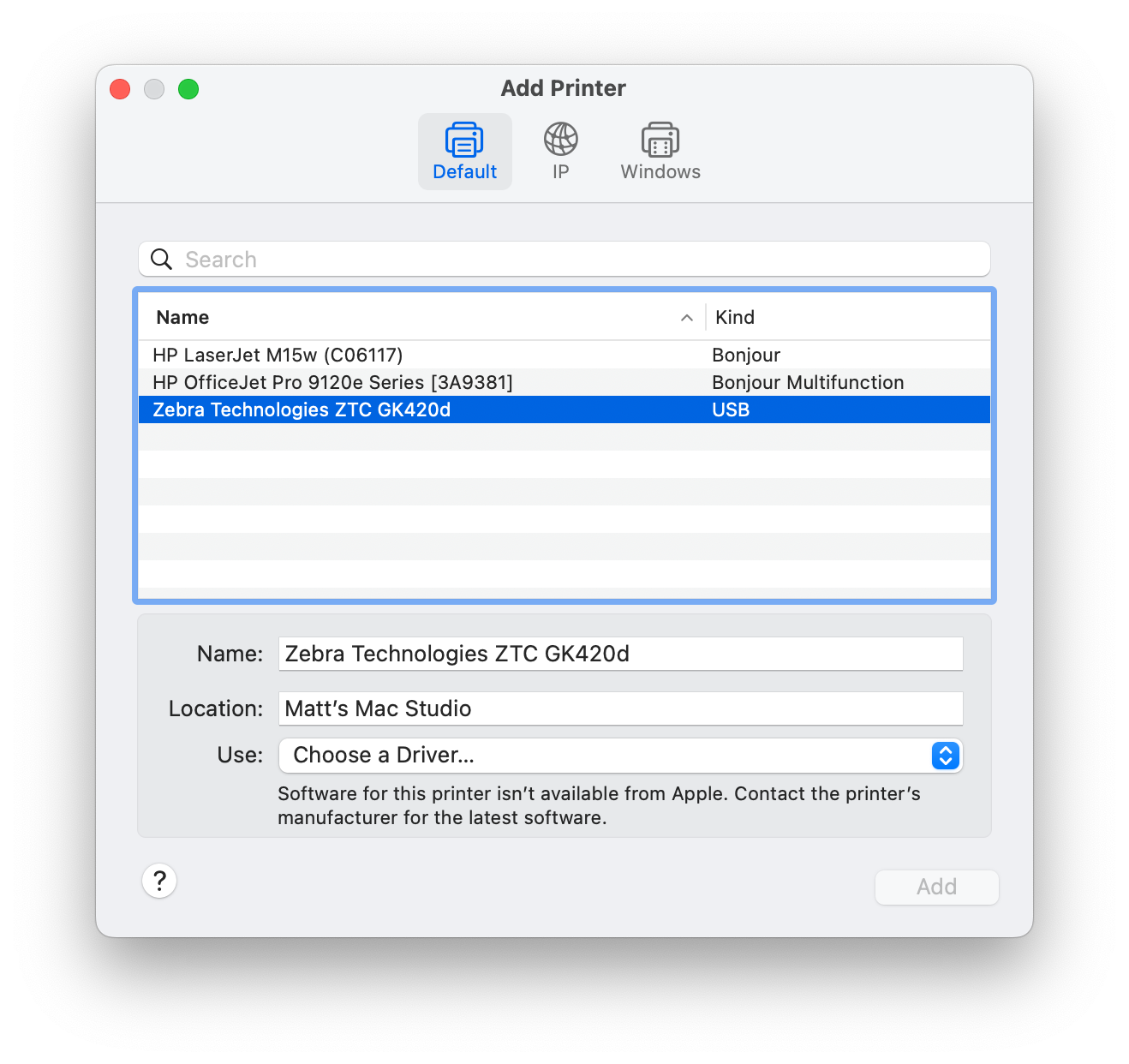
Adding a Zebra printer on Mac OS X
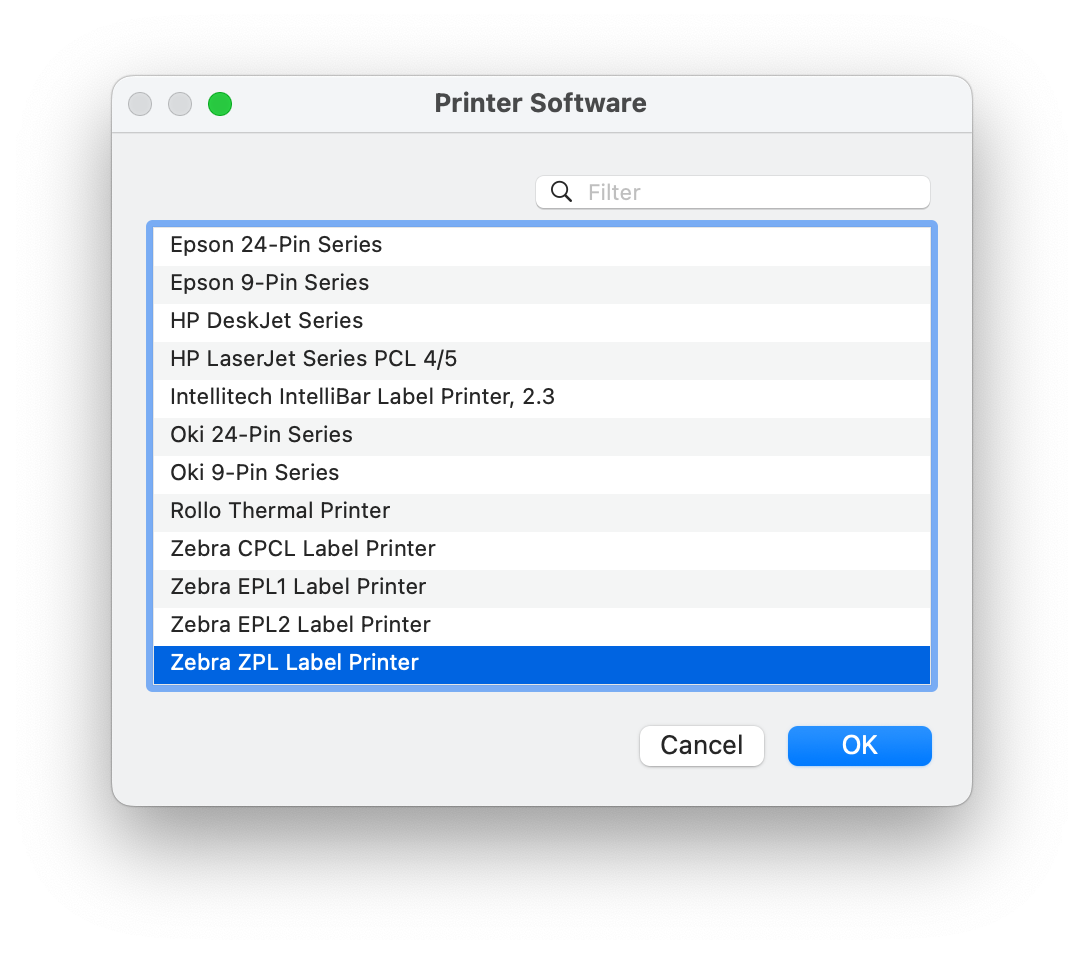
Selecting the driver for a Zebra printer on Mac OS X
Installing Dedicated Drivers
Here are links to driver download pages from major manufacturers:
Inkjet/Laser Printers
If you're printing sheets of labels (8.5x11"), you're likely using an inkjet or laser printer.
Since these page sizes are standard, there will likely be zero configuration needed for this setup. Place the label sheets into the printer drawer and print the PDFs as you would any other document.
Next Steps
- Once your printer is set up, see Printing Label PDFs.
- Match your template to the label stock in Label Templates.